Evidence remediation
Evidence remediation is for the moment when the school already knows support happened, but the record still needs repair.
Sometimes the evidence note is in Junipa, the teacher has done the work, and the missing piece is the attachment: a learning plan, meeting note, modified task, observation, email, timetable, photo or work sample that should sit with the record. The remediation view turns that broad problem into a focused list.
Instead of asking staff to check every student, it answers the useful question:
Which students have evidence records that need an attachment added now?
That matters because teachers do not need another open-ended audit. They need a short, clear set of rows where the next action is obvious.
Why remediation matters
Evidence gaps are usually specific. They are not always a sign that support is missing. Often they mean the record is nearly complete, but the file that explains the support was not attached.
That difference matters.
If the school treats every gap like a full review, staff lose time checking students whose records are already clear. If the school treats the gap as a focused remediation task, staff can concentrate on the core group of students who need a record repaired.
That is the value of remediation:
- It narrows the work to the students who need attention.
- It shows the evidence record that needs the file.
- It keeps the upload action beside the row, so the person fixing it does not have to search through the student profile.
- It gives leaders a practical way to support staff before census pressure builds.
The aim is not to create more administration. The aim is to make the missing proof visible early enough that someone can fix it calmly.
Start with the assigned list
An evidence remediation view can be prepared for a specific upload task. The teacher or staff member sees the records that need attachments, with open, resolved and total counts at the top.
This screenshot uses obfuscated example data. Student names, evidence records and the staff member name have been replaced.
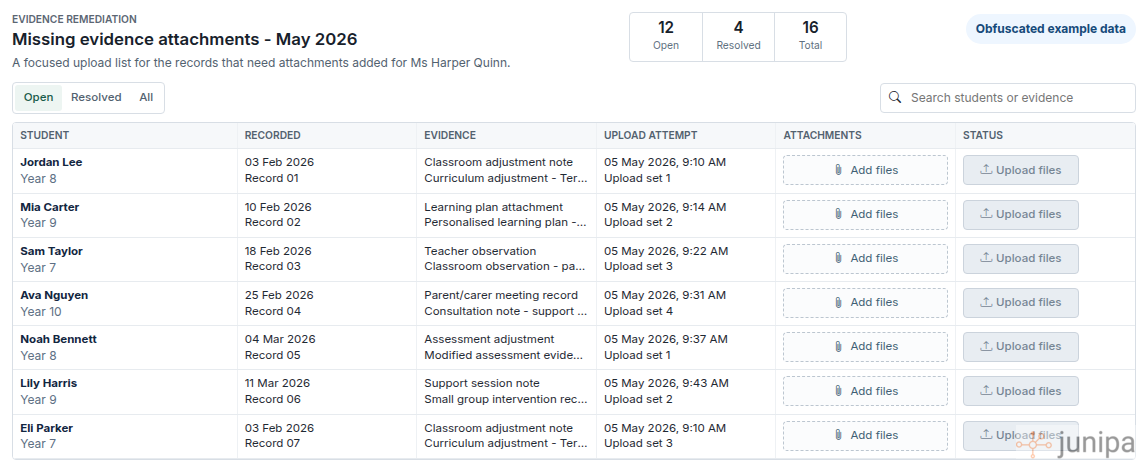
Use the list as a work queue. Start with the open rows. The student name tells you who the evidence belongs to, the recorded column tells you which record is being repaired, and the evidence column gives the context for the attachment.
The search box is useful when you are working from a folder of files or a known student group. Search for the student or evidence type, attach the file, then move to the next row.
Work one row at a time
The upload area is deliberately beside the evidence row. That keeps the decision small:
- Read the student and evidence context.
- Choose the matching file.
- Upload it against that row.
- Move on when the row is resolved.
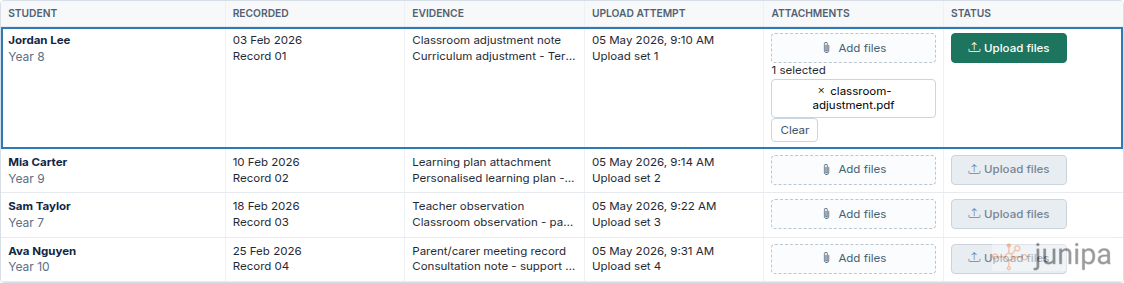
This is especially helpful when the missing attachment came from an older upload problem or a file-saving issue. The school does not need to recreate the support. It needs to reconnect the file to the evidence record.
What to upload
Choose the file that would help another staff member understand the support without needing a hallway conversation.
Good remediation attachments include:
- The learning plan or plan review that was current at the time.
- A modified task, assessment sample or student work sample.
- Meeting notes from a parent, carer, teacher or support team conversation.
- A timetable, seating plan, visual support, checklist or communication aid.
- A case note, observation or email that explains the adjustment.
The file does not need to be long. It needs to be clear enough to connect the evidence record to the support provided for the student.
Keep the focus narrow
The strength of this view is that it protects teacher time. A remediation list should not become a fresh audit of every student in the school.
Use it for the core group where Junipa already knows which record needs attention. Once those rows are resolved, leaders can return to broader reports such as Evidence Log, Plan Coverage or Adjustments with Attachments to decide whether more follow-up is needed.
That rhythm works well:
- Broad reports find the pattern.
- Remediation creates the focused task.
- Teachers upload the missing proof.
- The school checks what is still open.
Remediation is not about blame. It is about giving the right person a short list, a clear context, and a direct upload action.
A simple weekly pattern
As census approaches, use remediation lists as part of a weekly review:
- Check the open count.
- Work through the rows that belong to your student group or upload folder.
- Attach the clearest matching file.
- Revisit the resolved count before the next review meeting.
- Escalate only the rows where the right evidence is still unclear.
The goal is a calmer evidence conversation: fewer vague follow-ups, fewer whole-cohort checks, and more attention on the students whose records need a concrete repair.