Evidence Log
The Evidence Log report provides a chronological record of all adjustment evidence gathered across your school. It is useful for auditing evidence collection, verifying compliance, and reviewing staff activity at a glance.
Use it when the broad report shows a gap and you need to inspect the actual record trail.
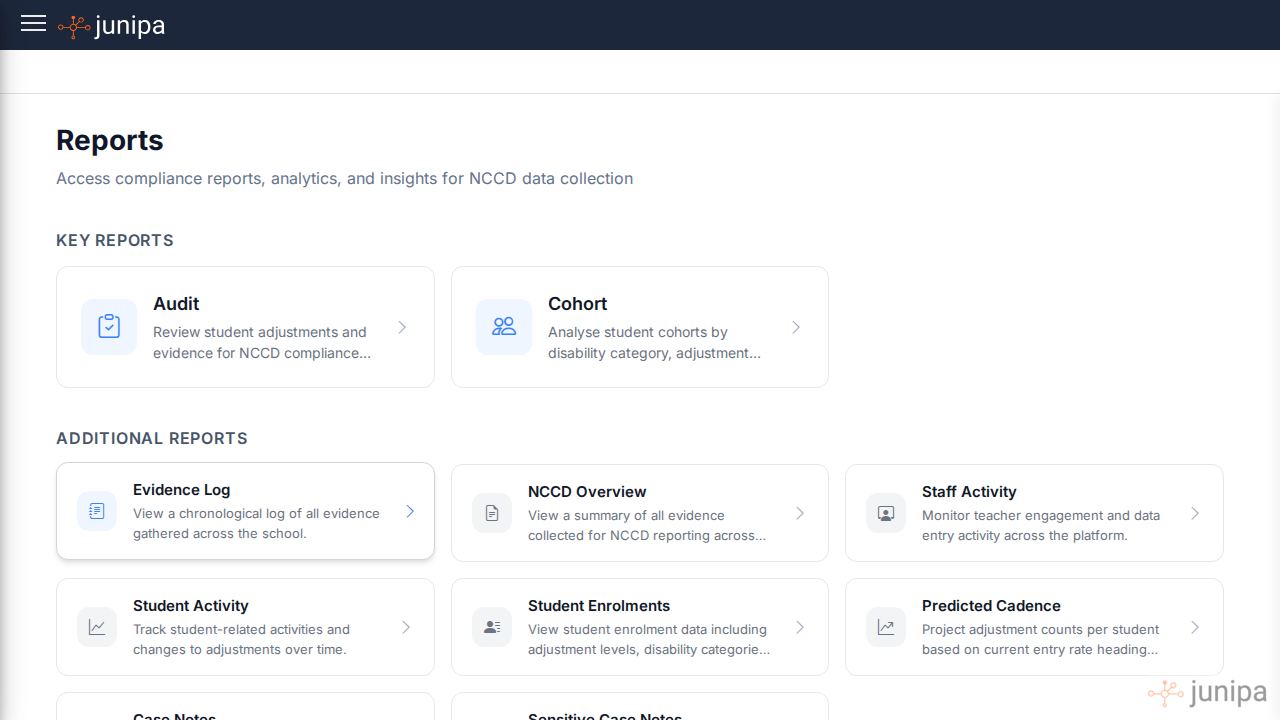
Accessing the Evidence Log
- Open the sidebar and select All Reports.
- Under Additional Reports, click Evidence Log.
Overview
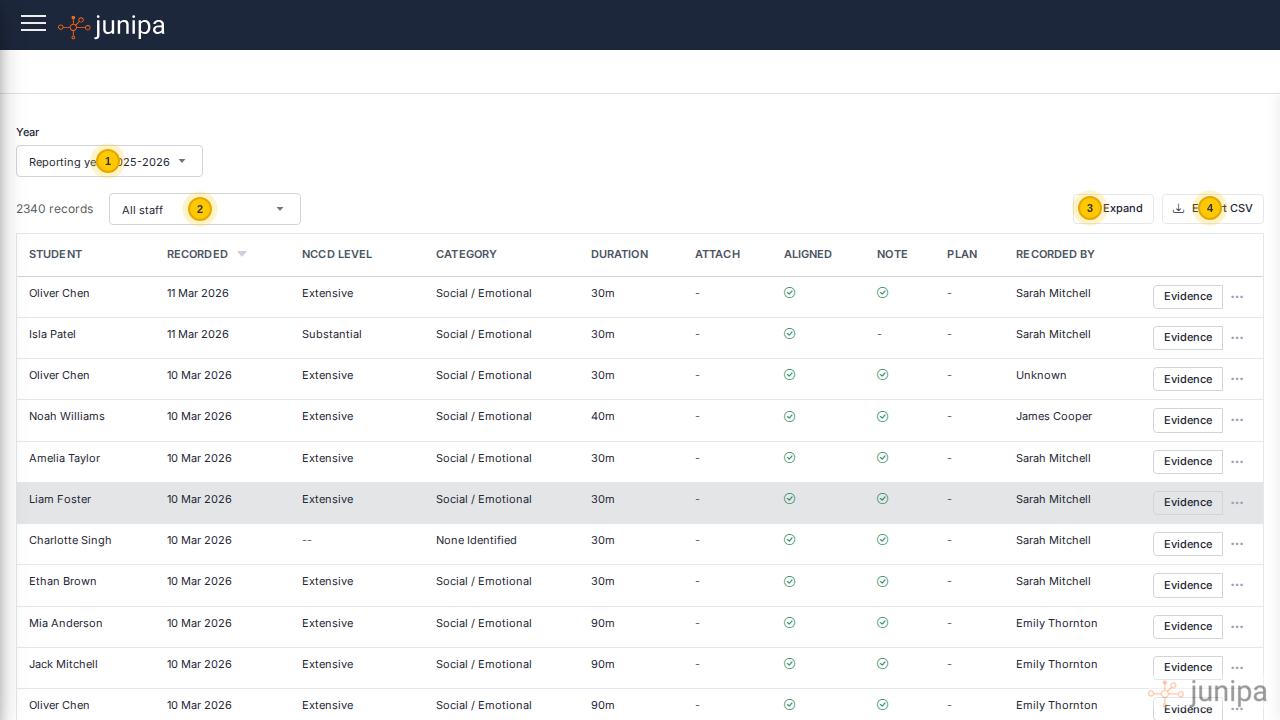
The Evidence Log displays one row per evidence entry, sorted by the most recently recorded date. Each row includes:
- Student: the student the evidence was recorded against
- Recorded: the date the evidence was entered
- NCCD Level: the adjustment level (Supplementary, Substantial, Extensive, or QDTP)
- Category: the disability category (e.g. Social / Emotional, Physical, Cognitive, Sensory)
- Duration: how long the adjustment session lasted
- Attach: whether a file attachment was included
- Aligned: whether the evidence is aligned to the student's diagnosis
- Note: whether a case note is linked
- Plan: whether the evidence is part of a student plan
- Recorded By: the staff member who entered the evidence
What to look for
Strong evidence is usually specific enough for another staff member to understand without asking the original teacher. When reviewing rows, look for:
- A clear description of the adjustment.
- A date that sits inside the period being reviewed.
- A staff member who can explain the record if needed.
- An attachment when the evidence refers to a file, plan, task or meeting.
- A linked note when the adjustment needs more context.
- Language that describes what happened for the student, not just that support occurred.
Key controls
- Year selector: choose the reporting year to view (e.g. 2025-2026)
- Staff filter: narrow results to evidence recorded by a specific staff member
- Expand: toggle an expanded view that shows additional detail below each row
- Export CSV: download the full evidence log as a CSV file for use in spreadsheets
Teacher-friendly examples
| Vague entry | Stronger entry |
|---|---|
| Helped with maths | Modified Year 7 fractions task with visual prompts and reduced question set. Student completed 8 of 10 questions independently. |
| Parent meeting | Met with parent to review sensory supports. Agreed to continue headphones during independent writing and review in four weeks. |
| Adjusted assessment | Provided extra time and separate room for English assessment. Attached adjusted assessment instructions. |
| Aide support | Education aide supported transition into science practical using visual checklist and pre-teaching of equipment names. |
These examples are not longer for the sake of length. They are clearer because they say what changed for the student.
Sorting
Click any column header to sort the table by that column. Click again to reverse the sort direction. The active sort column is indicated by an arrow beside the header label.
Filtering by Staff
Use the All staff dropdown to filter evidence to a single staff member. This is particularly helpful when reviewing an individual teacher's evidence collection or preparing for performance discussions.
Exporting
Click Export CSV to download the entire filtered result set as a comma-separated file. The export respects any active staff filter and year selection, so you can export a targeted subset of evidence.
When to move to another report
Use the Evidence Log for detail, then move elsewhere when the question changes:
- Use Audit Report to compare students across the school.
- Use Adjustments with Attachments when files are missing.
- Use Student Activity when a student has activity but no clear reporting decision.
- Use Plan Coverage when you need cohort-level gaps.
The Evidence Log loads data from the selected reporting year. Larger schools with thousands of evidence records may take a few moments to load.