Group adjustments
Use a group adjustment when the same support applies to more than one student.
This is most useful for a class, small intervention group, year level group, or selected students who need the same teaching change.
Before you start
Check the group first. A group adjustment is only useful when every selected student needs the same support.
Do not use it just because students sit in the same class. If the adjustment is different for each student, open the student records separately.
Make the group adjustment
- Open Students, Groups, or the filtered student list.
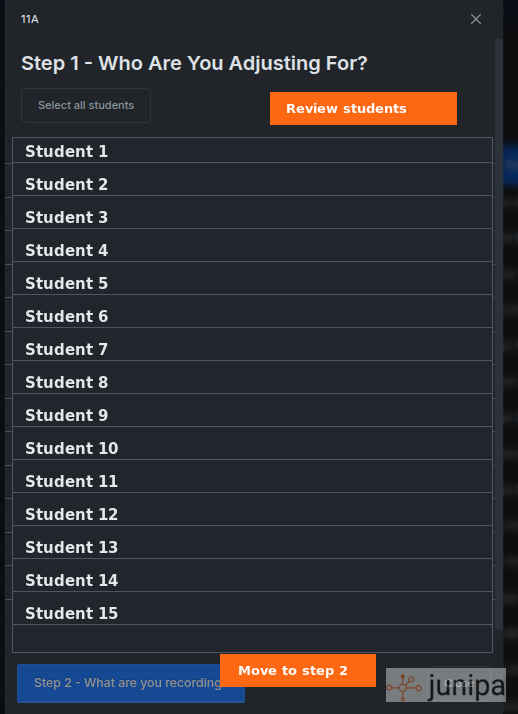
- Select the students who need the same adjustment.
- Choose the group action for Add adjustment or Group adjustment.
- Add the adjustment type, date, location and short description.
- Review the selected students before saving.
- Save the adjustment.
Create your own groups
Schools can use student groups to make repeated evidence work easier. Custom group creation may be behind a feature flag for your school, so ask Junipa if you expect to see it and it is not available.
Use Student Groups to create a manual group or smart group before recording group adjustments.
Write it clearly
Good group adjustment wording tells a teacher what changes in the lesson or task.
| Less useful | More useful |
|---|---|
| "Support in class" | "Provide vocabulary list and worked example before the writing task." |
| "Modified assessment" | "Use the shortened assessment version with extra reading time." |
| "Small group help" | "Run the first 10 minutes as guided practice before independent work." |
Check after saving
Open one or two student records from the group and confirm the adjustment appears as expected.
If the adjustment needs supporting evidence, add it close to when the support happens. Use adding evidence or attaching files when a work sample, note or plan needs to sit with the record.
When not to use a group adjustment
- Only one student needs the support.
- The wording needs to be different for each student.
- The group is too broad and includes students who do not need the adjustment.
- You are trying to fix old evidence gaps without checking the student records first.
Current bulk options
Junipa supports these patterns today:
- One adjustment to many students: use a group adjustment.
- Many adjustments to one student: open the student record and add the separate entries for that student.
- Many adjustments to many students: not currently available as a single many-to-many bulk workflow.
For files, multiple attachments can sit on one evidence entry when they belong to that entry. That is different from applying several different adjustments to several different students at once.
Multiple adjustments for multiple students
This request comes up during onboarding. It sounds valuable, and Junipa is open to building a better workflow for it.
The hard part is not the button. The hard part is the review model. Staff often know they want "bulk", but the exact workflow is less clear.
Useful questions:
- What is the trigger scenario, for example a relief lesson, class intervention, or end-of-week catch-up?
- Does "bulk" mean seeing a whole group on one screen, or applying multiple changes to multiple students?
- Should the workflow start from a student list, an adjustment template, a class group or a report?
- How should staff review the changes before they are applied?
- Who signs off when the support is meant to be differentiated?
Worth pausing on: previous bulk adjustment approaches have been rejected by school leaders when they made adjustments look like a conveyor belt. A useful workflow still needs qualitative detail, compliance confidence, and enough speed to remove duplicate work.
If this is a real need for your school, contact Junipa through junipa.com.au so we can draw out the workflow properly.
Next: edit adjustments.