How something so simple gets complex: deleting evidence without erasing history
Deleting a mistaken evidence record should be simple for the person doing it. The complexity belongs behind the button, where Junipa has to remove the record from daily work without pretending it never existed.
Recently that simple action failed for a staff member deleting evidence they had recorded themselves. The confirmation appeared, but the live school service did not recognise the request. The safe outcome occurred: nothing was partly deleted. The frustrating outcome also occurred: a valid action could not be completed.
That failure exposed how wide the promise of one Delete button really is.
Deletion should look simple to the person doing it
The person should not have to understand report indexes, weekly totals or audit history. They should find the mistaken item, choose Delete, select a reason, read the confirmation and decide.
This obfuscated example shows Junipa's established edit and delete convention on a student record. The names and details are demonstration data, and the Junipa watermark marks it as a support image.
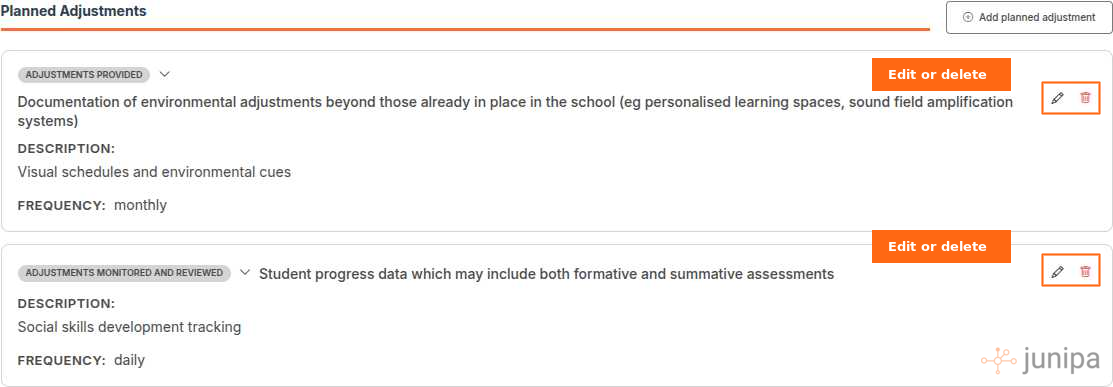
If the support happened and the details are merely incomplete, editing is usually the better choice. Deletion is for a record attached to the wrong student, a duplicate, a test entry or something that clearly should never appear as active evidence.
The screen can keep that decision simple because the system does the harder work afterwards.
Delete is a lifecycle state, not an eraser
Evidence supports decisions about a student. Removing it from normal screens must not mean rewriting the past so thoroughly that nobody can explain what changed.
Junipa therefore treats deletion as a new state of the same record. The evidence is marked as deleted, its lifecycle version moves forward, and an audit entry records the person, time and reason. The original details remain available to authorised administrators, but the record stops behaving like active evidence.
That distinction lets a school hold two necessary truths at once:
- The mistaken record must not appear in business-as-usual screens, counts or external reports.
- The school must still be able to account for the record and the decision to remove it.
The history is immutable in the practical sense that deletion adds an accountable event instead of erasing the trail. The active view is allowed to change. The facts needed to explain that change remain.
What has to be preserved when evidence is deleted
A trustworthy deletion retains enough context for an administrator to answer the questions that arrive later:
- Which student and reporting year did the evidence belong to?
- What kind of evidence was it, and when was it originally recorded?
- Who originally recorded it?
- Who deleted it, and were they acting as the owner or as an administrator?
- What reason did they give?
- Was a linked case note also removed from ordinary use?
- What did the lifecycle look like immediately before and after the change?
The original record identity matters. Creating a disconnected "deleted items" copy would make it easier for the active and historical versions to drift apart. Keeping one identity, a forward-moving lifecycle version and an appended audit receipt makes the relationship explicit.
It also makes restoration understandable. An administrator does not manufacture a replacement record. They restore the known record, advance its lifecycle again, record the reason, and allow it to count as active evidence once more.
What has to disappear from ordinary school work
Preserving history does not mean leaving deleted material everywhere with a faint label. That would be confusing for staff and dangerous for reporting.
Once deletion succeeds, the record should no longer appear as current evidence in:
- The student's ordinary activity and evidence views.
- Teacher and administrator evidence lists.
- Cohort and school evidence dashboards.
- Weekly adjustment views.
- Evidence Log and ordinary audit-readiness reports.
- Organisation summaries and outbound reporting feeds.
- New exports prepared for people outside the day-to-day Junipa workflow.
The deletion event itself can remain in the activity history for people with the right access. It says that evidence was deleted and why. It does not continue presenting the deleted content as active support.
For administrators, Edited & deleted evidence provides the other side of the view: the record, the lifecycle history and the restore action. Daily screens stay clean while accountable recall remains possible.
Every tally affected by the record must be recalculated
An evidence item is rarely counted in one place. It can contribute to school totals, a teacher's activity, a week, a student group, an attachment measure and several report categories at the same time.
Deletion therefore means more than subtracting one from a headline number.
| Measure | What must change after deletion |
|---|---|
| Active evidence total | Remove the record from the reporting-year count. |
| Weekly activity | Recalculate the week in which the evidence was recorded. |
| Evidence category and type | Remove the contribution from the matching category and subtype. |
| Adjustment and disability breakdowns | Recalculate the affected classification totals. |
| Teacher activity | Recalculate evidence recorded, attachments, students supported and the most recent activity date. |
| Time and alignment measures | Recalculate recorded time, averages and alignment percentages without the deleted item. |
| Student and cohort summaries | Refresh the visible counts for the affected student and any cohort containing them. |
| Reports and exports | Omit the record from newly produced ordinary reports while retaining it in authorised audit recall. |
| Linked case notes | Change separately and only when the person confirms it and has authority to do so. |
This is why deleting one item can expose errors that saving one item did not. A save mainly adds. A delete has to prove that every downstream view understands the difference between "still stored" and "still active".
Modern frameworks help with propagation, not judgement
Current programming frameworks give us useful ways to coordinate the change without asking every screen to invent its own deletion logic.
A server-side transaction can check authority, confirm that the person is acting on the current lifecycle version, mark the record, append the audit receipt and write the student activity entry as one outcome. If any required part fails, none of those parts should be left half-finished.
An idempotency key protects against the same confirmation being submitted twice. A version check protects against one person deleting a stale copy after somebody else has already changed the record.
Reactive application services can then notify the open student, teacher, cohort and dashboard views that their source data changed. Those views refresh from the source instead of each trying to guess how much to subtract.
Background change handlers can copy the lifecycle state into reporting views and rebuild weekly, teacher and school summaries. A shared definition of "active evidence" keeps those calculations aligned: included, not deleted, and eligible for the selected reporting year.
The framework moves the message. It does not decide the policy. We still have to define who may delete, what history remains, which reports must exclude the record, and who may restore it.
Cross-checking is part of the deletion, not an afterthought
A successful confirmation message proves that the lifecycle change was accepted. It does not, by itself, prove that every tally is correct.
The useful cross-check is an invariant: the record appears once in authorised history, zero times in active evidence, and zero times in newly generated ordinary reports.
We check that invariant across the affected surfaces:
- The student record no longer presents the evidence as active.
- The student activity history records the deletion and reason.
- The reporting-year and weekly counts no longer include it.
- Teacher, student and cohort summaries agree with the active source records.
- Evidence Log, school reports and external exports omit it.
- The administrator's edited and deleted evidence view can still recall it.
- Restoring the record reverses the active tallies without duplicating the evidence or losing the deletion history.
That final restore check is particularly useful. It tests whether deletion changed lifecycle state cleanly or damaged the relationship between the source record and its summaries.
What the failed delete taught us
In this case the user interface and the code responsible for safe deletion were ahead of the live school service. The screen knew how to ask. The service running for that school did not yet have the matching lifecycle route, so it returned "not found" before any transaction began.
The remediation was not to bypass the safety work or write directly to the record. It was to bring the live service up to the same version, verify that the request reached its permission boundary, and make the failed action visible in operational error monitoring.
That last part matters. The staff member who encountered the failure was also on an internal filtered-user list. Turning off one staff-only filter did not reliably include those events because a second filtered-user rule still applied. The error view now carries those filter choices in its address and applies them consistently, so an authorised operator can deliberately include internal events while investigating.
No evidence was partly removed during the failure. Once the live service was updated, the same simple action could travel through the complete lifecycle instead of stopping at the front door.
Frequently asked questions about deleting evidence
Is deleted evidence permanently erased?
No. It is removed from ordinary work screens, counts and newly generated external reports. Its original details and deletion history remain available through authorised administrator and audit views.
Who can delete an evidence record?
A staff member may delete evidence they own when their school role includes that permission. Administrators with the broader evidence-deletion permission may delete another person's record. The service checks current authority again when the action is submitted.
Why not physically delete the record?
Physical deletion would make it difficult to explain a changed report, investigate a mistake or restore something removed in error. A lifecycle change protects daily accuracy without destroying accountable history.
What should I do if the evidence happened but contains a mistake?
Edit the record when the support occurred and the detail needs correction. Delete when the record itself should not remain active. If you are unsure, pause and ask the case manager or learning support lead.
For the practical school workflow, see Deleting evidence. To cross-check active evidence after a change, use Evidence Log and Audit Report.