Continuous Off-Site Adjustment
Some students are not on campus for the whole week. They might be on work experience two days, at a VET provider one morning, or out for a medical appointment. The school is still responsible for their adjustments on those days, and still has to be able to show it under the NCCD.
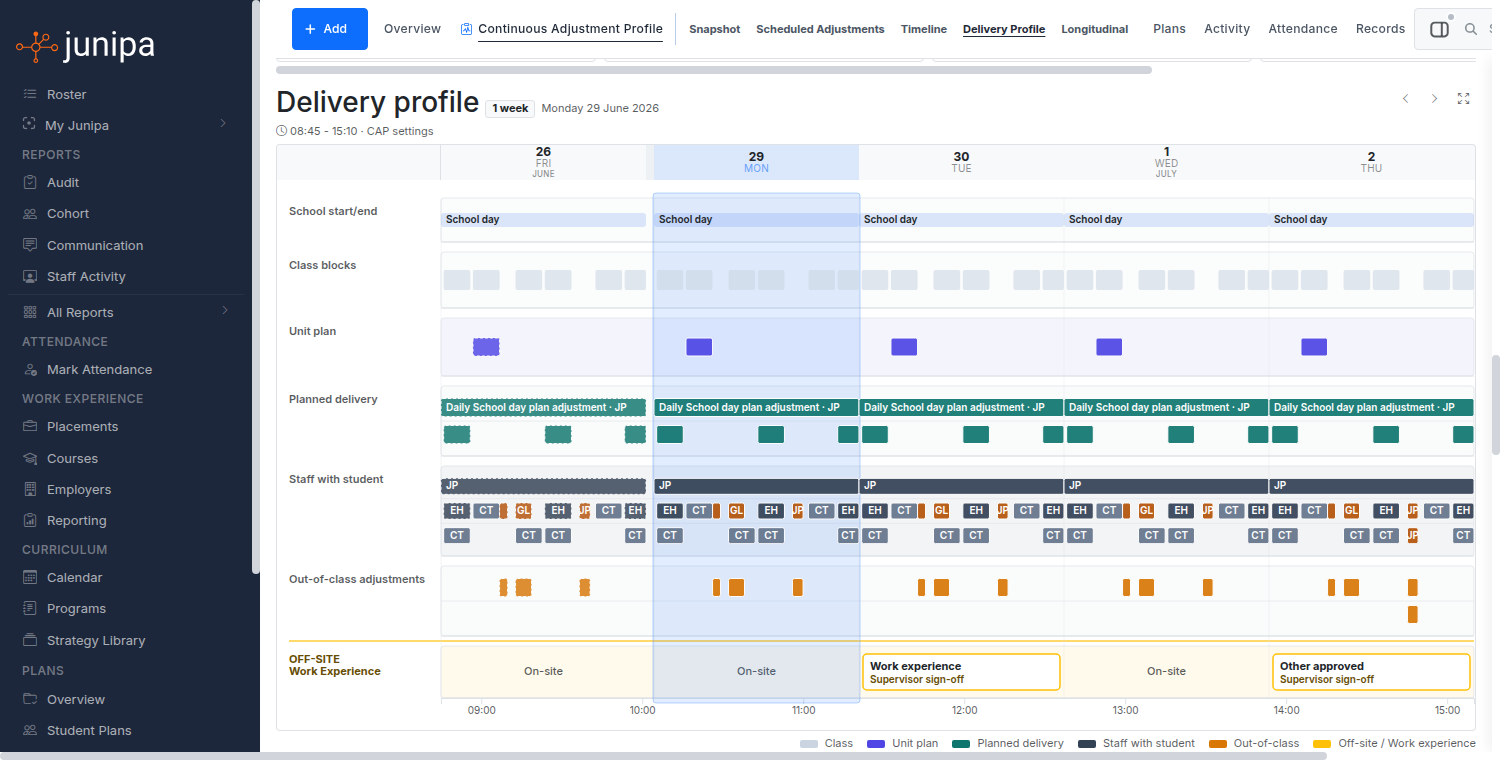
The Continuous Off-Site Adjustment schedule is where you plan that coverage, name who is responsible, and confirm after the fact that the support actually happened. It is the off-campus partner to the Continuous Adjustment Profile, which covers students who need continuous support on campus.
When to use it
Use an off-site schedule when a student is regularly away from the school site for part of their week. The common cases are:
- Work experience with a host employer
- VET delivered at a registered training organisation
- Medical appointments or treatment days
- Study days off campus
- Any other arranged off-site day
A day does not have to be all-or-nothing. A student can be on campus in the morning and off site from midday, and the schedule handles that part-day case.
Where the schedule lives
The off-site schedule is a plan template stored against the student, alongside their other plans. You add it the same way you add any plan: from the student's Plans tab, choose Continuous Off-Campus Coverage Schedule.
Once it exists, the schedule has three parts: the profile (the setup), the weekly grid (the plan), and confirmation (the proof).
Setting up the profile
The profile records the frame the schedule sits in, so you do not have to re-enter it on every day:
| Field | What it records |
|---|---|
| School day window | The standard day, e.g. 9:00am to 3:15pm. |
| School week | Which weekdays are school days, e.g. Mon to Fri. |
| Academic year and term | The period the schedule applies to. |
| Review cadence | How often the arrangement is reviewed, e.g. per term. |
| Consultation | The parent or guardian consultation record. Off-site arrangements are an adjustment, so the consultation expected under the Disability Standards for Education 2005 is captured here. |
By default the week is Monday to Friday and every day starts on campus. Turn on the weekend toggle only if you need to schedule a Saturday or Sunday.
Building the weekly grid
The grid is a calendar laid out Monday to Sunday. Each day can be set to one of four states:
- On site — the student is at school as normal.
- Off site — the student is away for all or part of the day.
- Provisional — the day is expected to be off site but is not yet locked in.
- None — the day is not part of the schedule.
When a day is off site you record:
- Why — work experience, VET, medical, study day, or other (with a free-text description for other).
- Where — the host employer, VET provider, off-site campus, medical, or other, plus a free-text location such as the employer name or clinic.
- Time — leave the times blank for a whole day off site, or set a from and to time for a part-day. A part-day is the case where a student is on campus first, then off site, in the same day.
Coverage: who is responsible
A scheduled off-site day is not covered until someone is named against it. Each day carries one or more coverage assignments, and each one records:
- The staff member responsible for the support that day.
- The planned support, either as free text or, better, linked to a real planned adjustment from the student's evidence model. When you link an adjustment, the cell shows its label and stays connected to the underlying adjustment and evidence record.
- An optional connected plan, such as a risk assessment or a work experience schedule.
Weeks that repeat differently
Most schedules are the same every week, but they do not have to be:
- Every week — the default. The pattern applies to every week.
- Alternating — an A and B fortnight, for arrangements that change week to week.
- Monthly — tied to a position in the month.
- Dynamic — for arrangements where you know roughly how many days are off site but not which ones. The grid is replaced by a per-week quota (for example, two off site, three on site) and a free-text note. Scheduling and reporting against specific days are not available while a schedule is dynamic, so use it only when fixed days genuinely are not known.
Confirming a day happened
A plan on its own is not evidence. The schedule becomes evidence when the day is confirmed.
The staff member assigned to a day confirms it directly on the schedule, without a separate form. Expanding the day cell shows a short confirmation with two outcomes:
- Done — the student was present and the planned support was delivered. A single Done confirms both at once.
- Not done — with a note explaining why.
A confirmation records who confirmed it and when. If a coordinator or admin confirms on behalf of the assigned staff member, the schedule records that too, and shows it as "Confirmed by [admin] on behalf of [staff]".
Confirmations are tied to the actual calendar date, not the recurring pattern. Confirming the Thursday of one week does not mark every other Thursday as done. Each dated day is confirmed on its own.
How this feeds reporting
Every confirmed day rolls up into the Adjustment Continuity Report, which shows, per student and across the campus, how many scheduled off-site days have been confirmed and where coverage is at risk. Linking the support to a real planned adjustment, rather than free text, is what lets the report and the student's evidence trail line up.
Quick checklist
- Add the Continuous Off-Campus Coverage Schedule plan to the student.
- Fill in the profile: day window, week, term, review cadence, and the parent consultation.
- Build the weekly grid: mark each off-site day with why, where, and (for part-days) the time.
- Add coverage to each off-site day: name the staff member and link the planned adjustment.
- After each day, the assigned staff member confirms Done or Not done.
- Track the cohort on the Adjustment Continuity Report.
For students who instead need continuous support across the whole school day on campus, see Continuous Adjustment Profile.