Adjustment Level Changes
The Adjustment Level Changes report shows which students moved between adjustment levels during a reporting year, when the change happened, and who made it. It is built for the question that matters most at review time: who has shifted between Supplementary, Substantial and Extensive, and is that shift backed by evidence.
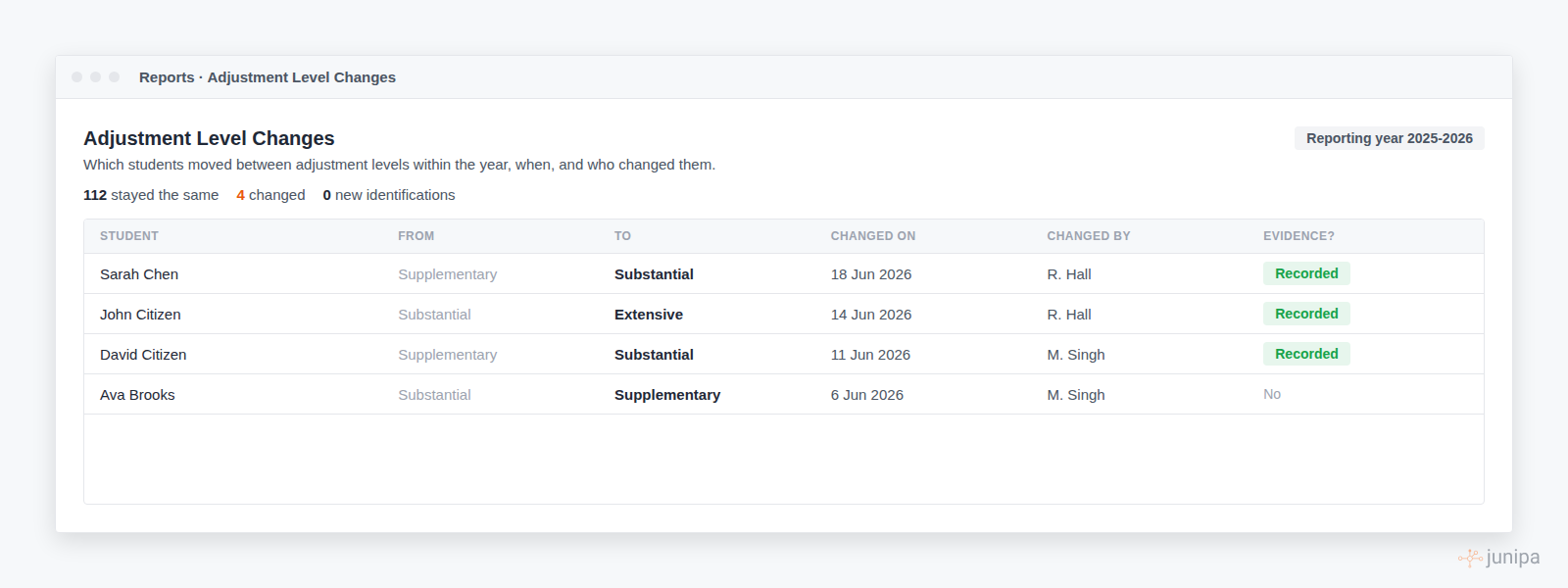
What the report answers
The summary line across the top gives you the shape of the year at a glance.
- Stayed the same. Students whose level did not change.
- Changed. Students who moved from one level to another.
- New identifications. Students who went from no level to a level for the first time.
Below that, the table lists every change with the student, the level they came from, the level they moved to, the date of the change, the staff member who made it, and whether it was recorded as a piece of evidence.
Choose the reporting year
Use the reporting year selector at the top to look at the current year or any earlier year. Changes are tracked within a single reporting year, so each year tells its own story.
Filter to the changes that matter
Two filters are on by default so the table stays focused on level shifts between funded levels.
- Hide new identifications. Hides students who went from no level to a level. Turn this off to include first-time identifications.
- Hide QDTP transitions. Hides movements in and out of QDTP so the table centres on Supplementary, Substantial and Extensive. Turn this off to see every movement.
Switch between the table and the matrix
A table is the clearest way to read individual changes. For the bigger picture, switch to the Matrix view. The matrix is a grid of from level against to level, so you can see at a glance how many students moved in each direction and how many held steady.
See the change as evidence
When a change is recorded as evidence, it appears in the student's activity log and evidence log like any other record, attributed to the person who made the change. You can open and edit it from there. This is controlled by a school setting, described next.