Reports Hub
The Reports hub is the starting point for school reporting. It brings the key report views together so staff can choose the right view for the question they are trying to answer.
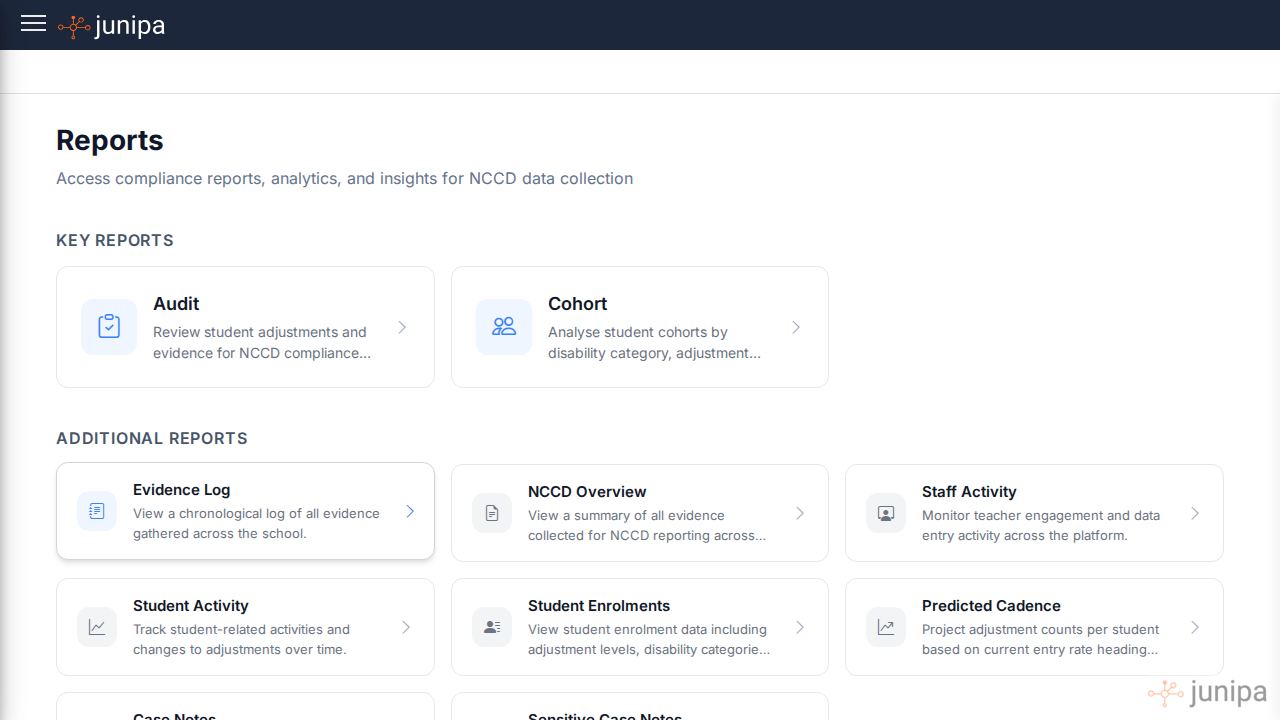
Use the hub to avoid guessing
Start from the question, not from the menu item.
- Need the broad evidence picture? Open Audit Report.
- Need the proof trail? Open Evidence Log.
- Need census counts and levels? Open NCCD Overview.
- Need students with activity but unclear reporting status? Open Student Activity.
- Need to know which staff are around a student? Open Student Support Network.
- Need files attached to adjustments? Open Adjustments with Attachments.
- Need year group coverage? Open Plan Coverage.
For non-technical staff
The Reports hub is not a technical dashboard. It is a map of school follow-up work. Each report should help someone answer one practical question about a student, a cohort or a reporting deadline.
If a teacher is unsure where to start, ask them what they are trying to find:
- "Do you need to add proof?"
- "Do you need to check what happened?"
- "Do you need to know whether the student is included?"
- "Do you need to see whether a whole year group has gaps?"
- "Do you need to know who else is supporting this student?"
Then choose the report that matches the question.